ShadowSwing The swing trainer for tennis, padel and pickleball
Practice your swings anywhere. Hold your phone like a racket or paddle handle, swing, and hear the swing sound the moment the racket head is moving fast enough. Follow a guided workout, or replay a single stroke in 3D.
How it works
Your phone is the racket
ShadowSwing works like a mechanical training stick (the kind that clacks when you accelerate through the swing), tuned to reward the whip of a real stroke, since that is the easy way to get the racket head moving fast without forcing it.
Hold it like a handle
Grip the phone the way you grip a racket. The top of the phone is the racket tip, the screen is the string face. Clear the space around you and hold on tight.
Swing a real stroke
Forehand, backhand, serve, volley. The accelerometer and gyroscope track the phone through the stroke, on the device, in real time.
Hear the contact
A swing sound fires at contact once the racket head is moving fast enough. Push slowly and nothing happens; let the racket head go and it snaps. That feedback is the whole training loop.
Inside the app
Rally, follow a workout, or study one stroke
Three ways to swing, plus a daily goal and the numbers that prove the work is going in. Here is each of them, straight from the app.
Free Hitting
Hear the whip
Every whip hits.
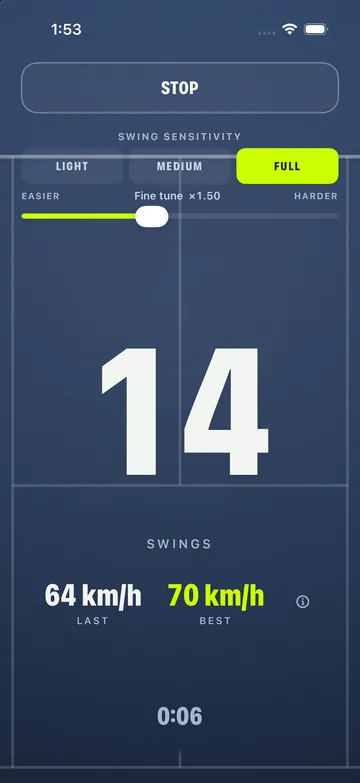
Rally mode. The app counts your swings and runs a timer, so a session in a hallway, a hotel room or a warm-up before a match becomes something you can actually measure. Let the racket head go and the swing sound fires at contact; push it slowly and nothing happens.
- A hit on every clean release
- Live swing count
- Session timer
- Estimated ball speed and racket-head speed on every swing
Shot Analysis
One stroke, replayed in 3D
Is your wrist loose?
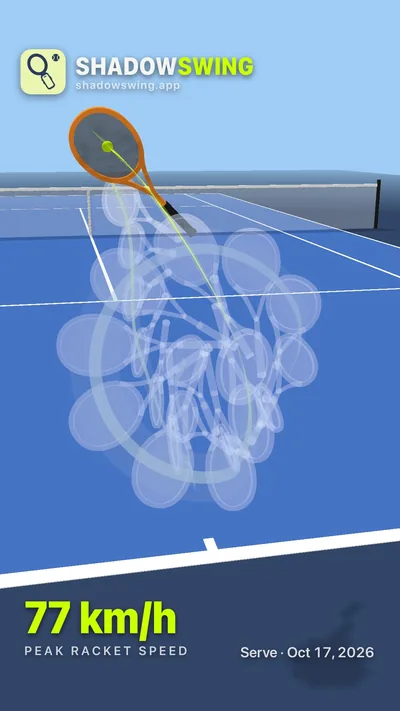
Play one stroke, then watch it replayed on a 3D court: the path the racket head traveled, where the string face was pointing through the swing, and your peak speed: estimated ball speed, with racket-head speed under it. Orbit the replay and slow it down.
- Swing path drawn in 3D
- String face orientation through contact
- Estimated ball speed and peak racket-head speed
- Orbit and slow motion
Workouts
A coach calls the strokes
Warm-ups to serve days.
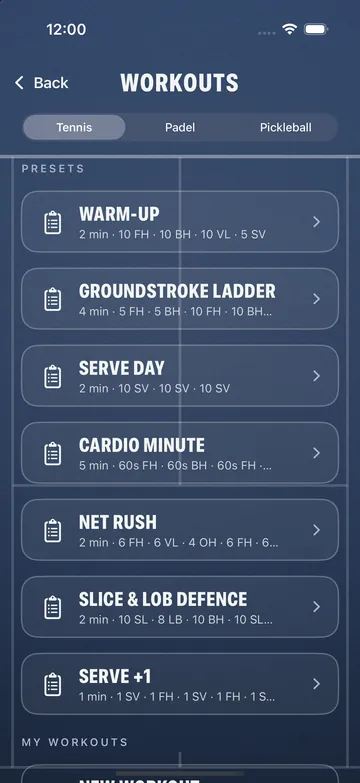
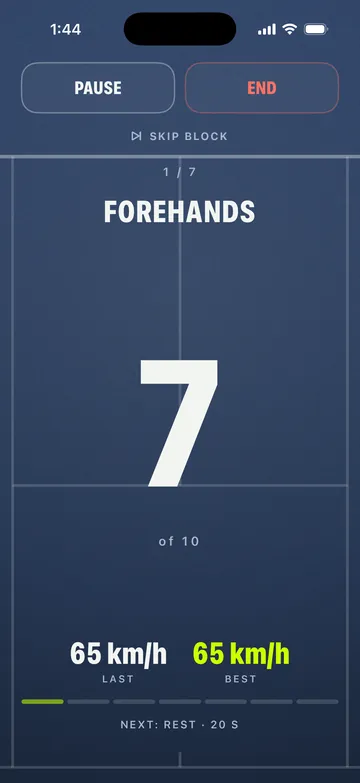
Guided drills with a coach voice. It calls the stroke and the count, the hit keeps score, and the rests are timed. Warm-ups, groundstroke ladders, serve days and cardio minutes for each sport, or build your own.
- Coach voice in English, French and Spanish
- Rep-based and timed blocks
- Presets for tennis, padel and pickleball
- Voice off? Haptics carry the cues
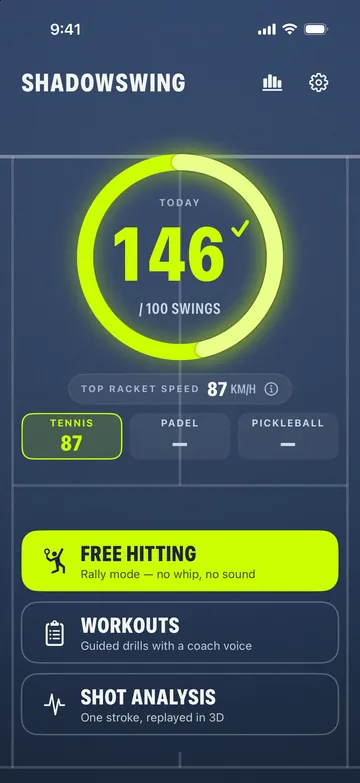
Daily goal ring
Close your ring every day
Fills as you practice.
Choose how many swings a day you are after, and a ring on the Home screen fills as you practice. Free Hitting and workout swings both count, and the ring starts empty every morning. A missed day is not held against you: tomorrow's ring simply starts empty. New to practicing every day? Start with how to build a daily practice habit.
- Set your goal in Settings, or long-press the ring
- Any goal you like
- Optional reminder: one nudge on days your ring is still open
- Never more than one notification a day
Stats
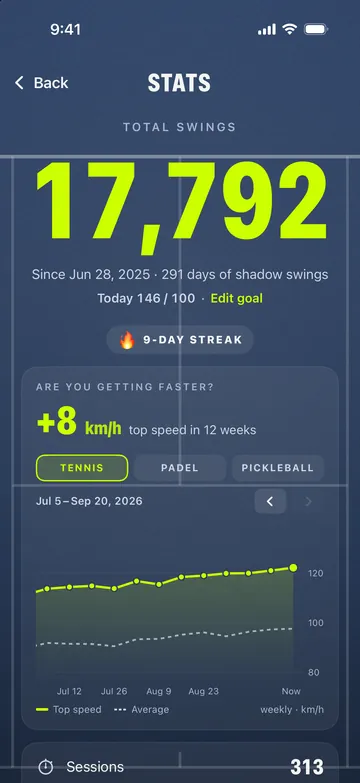
Your practice, added up
Proof the work is going in.
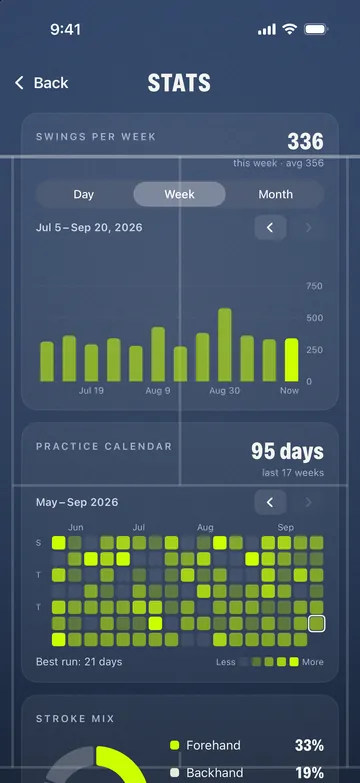
Your lifetime numbers in one place: total swings, sessions, workouts, days practiced, and your current and longest streak. Graphs show whether the work is paying off, and you can scroll back through all of it.
- Swings per day, week or month
- Racket-speed trend for each sport
- Practice calendar, stroke mix and time practiced
- Kept on your phone, no account
Share your swing
Send it to your coach
As an image or a video.
Any Shot Analysis replay can go straight to your coach, a training partner or the group chat, as a still image or a short video of the stroke on the 3D court.
- Image or video, your choice
- The swing path drawn on the court
- Stroke and date on every share
Three sports
Tennis, padel and pickleball
Each sport sounds like itself.
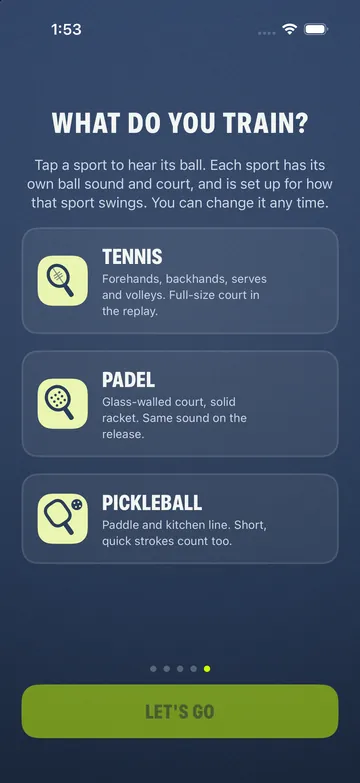
Pick your sport and everything follows it: its own ball sound, a padel racket on a glass-walled court or a pickleball paddle and the kitchen line in the replay, and a swing sensitivity that starts easier for padel and pickleball because the strokes are shorter and quicker. Switch any time in Settings.
- Workout presets for each sport
- Racket-speed trend kept per sport
- Dynamic hit for tennis: the ball sound follows how hard you swing
- Guides for padel and pickleball practice at home


Reviews
What players say
Four App Store reviews of the iPhone app, quoted word for word.
Nice and easy way to shadow swing with instant feedback. Makes the repetitions more fun and constructive.
This is way better than any YouTube tutorial I've watched!!!
Great app! It's helped me clean up my backhand and improve my swing path way faster than I expected. The feedback is easy to understand and actually helps you make real improvements.
Helps me visualize and work on my shots before I get on the court
Who it is for
Who it is for, and who it is not for
It is for
ShadowSwing is for tennis players who want to practice forehand, backhand, serve and volley swings at home without a court, ball or partner. It suits players warming up before a match, players keeping their timing through the off-season or an injury layoff, players traveling without a racket, and coaches who want a swing-timing drill a student can repeat at home. Beginners use it to feel what a released wrist is supposed to sound like; club players use it to keep a groove.
It is not for
There is no ball, so ShadowSwing does not measure real ball speed, spin or where a ball would land: the ball speed it shows is an estimate from your racket-head speed. It does not watch your body, so it cannot correct your grip, stance, footwork or contact point. It is not a coach, not a physiotherapy or medical tool, and not a substitute for hitting real balls on a court. It runs on iPhone (iOS 17 or later) and on Android phones (Android 8.0 or later); there is no iPad, Apple Watch, Wear OS or web version.
ShadowSwing Pro
Everything ShadowSwing does
ShadowSwing is free to download, no account needed. It comes with a few one-time free tries of Free Hitting, Shot Analysis and a guided workout, with no refills; after that, ShadowSwing Pro gives you everything.
What ShadowSwing Pro includes
- Free Hitting whenever you want.
- Estimated ball speed and racket-head speed on every swing, in km/h or mph, with your all-time record.
- Progress graphs. Swings per day, week or month, your racket-speed trend per sport, a practice calendar, your stroke mix and time practiced.
- Any daily goal you like.
- Shot Analysis replays whenever you want.
- Every preset workout, plus your own built with the coach voice.
- The full sound pack, shuffle and Dynamic hit. Every sport's real sound, plus the rest of the recorded pack, including soft, medium and hard tennis hits from real recordings, rotating at random if you like. Dynamic hit, for tennis: the ball sound follows how hard you swing.
- Use your own sounds. Import any audio files as your swing sound, add several, and shuffle between them.
- Sensitivity tuning for how hard you want the release to be.
Free to download
- Download it free and start swinging
- No account needed
- A few one-time free tries, with no refills
- Then subscribe, or start the 7-day free trial on the yearly plan
- No ads, no tracking
Yearly
$39.99/yrBest value, about $3.33 a month. 7-day free trial.
Monthly
$4.99/moCancel any time in your Apple ID settings or in Google Play.
Free download
$0No account. A few one-time free tries, with no refills.
Prices are in USD and vary by region. Purchases and refunds are handled by Apple on iPhone and by Google Play on Android.
Ready to try it?
Free to download on iPhone and Android.
Privacy
Nothing leaves your phone
Motion data from the accelerometer and gyroscope is processed on the device and never sent anywhere. There is no account to create. Anonymous usage counts and crash reports (TelemetryDeck) can be switched off, feedback is sent only if you choose to send it, and there is no other third-party SDK. Purchases go through Apple or Google Play. Read the full privacy policy.
Requires an iPhone running iOS 17 or later, or an Android phone running Android 8.0 or later. Available in 14 languages.
FAQ
Questions
Which phones does ShadowSwing work on?
It works on any iPhone running iOS 17 or later and on Android phones running Android 8.0 or later. The app reads the accelerometer and gyroscope: every iPhone that supports iOS 17 has both, and Google Play offers ShadowSwing only to Android devices that have both. It is made for phones: there is no iPad, Apple Watch, Wear OS or web version.
Do I need a racket, a ball, a court or a partner?
No. You hold the phone itself like a racket handle: the top of the phone is the racket tip and the screen is the string face. You need about two meters of clear space around you and nothing else. For the drills themselves, see our guides to shadow swing drills and practicing tennis alone at home.
What does the swing sound mean?
It means the racket head reached real speed through contact, the kind a loose wrist and a whip give you without forcing it. A slow, pushed swing stays silent on purpose: the silence is the feedback. That one sound is the whole idea of the app; everything else (workouts, the 3D replay, racket speed) is built around it.
Does it work for padel and pickleball?
Yes. Pick your sport in the app and everything follows it: the replay shows a padel racket on a glass-walled court, or a pickleball paddle and the kitchen line, the head-speed lever matches the shorter racket, and the swing sensitivity starts easier for those two sports because the strokes are shorter and quicker. You can adjust it in Advanced settings. See our guides to padel training at home and pickleball practice at home, both without a court.
What are Workouts, and does the app know which stroke I hit?
A workout is a list of blocks: a stroke and a number of reps, a stroke for a set time, or a rest. A coach voice calls each one — "Forehands. Twenty. Go." — each hit counts a rep, and rests are timed for you. The app does not watch you, so it cannot verify that you actually hit a backhand; it counts a rep whenever the racket head is moving fast enough. Doing the stroke it asked for is on you. There are presets for tennis, padel and pickleball, the voice speaks English, French and Spanish, and you can turn it off and let the haptics carry the cues. You can also build your own.
Does ShadowSwing track my progress?
Yes. A ring on the Home screen fills toward a daily swing goal you pick, and Free Hitting and workout swings both count; it starts empty each morning. Stats keeps your lifetime numbers: total swings, sessions, workouts, days practiced and your current and longest streak. Stats also shows graphs of your swings per day, week or month, your racket-speed trend for each sport, a practice calendar, your stroke mix and time practiced, all the way back to your first recorded day. Optional reminders send one nudge at the time you choose on days your ring is still open, never more than one a day. Everything is kept on your phone.
Why does the swing sound late through my AirPods or any Bluetooth earbuds or speaker?
Bluetooth audio adds latency on any phone, and the whole point of the app is that the sound lands exactly at contact. The delay comes from the Bluetooth link, not the phone brand. Wired headphones or the phone's built-in speaker give the tightest hit sound; Bluetooth will feel a beat behind.
Does ShadowSwing show ball speed?
It estimates it. There is no real ball and no radar. The app first estimates racket-head speed from the phone's own motion: the accelerometer gives how fast your hand is traveling, and the gyroscope adds the rotation, because a racket head sits roughly 55 cm past your hand and sweeps a wider, faster arc when the wrist snaps. That extra is the whip the app trains. Treat it as a consistent number to improve against, not a radar reading, and do not compare it across sports — a padel racket and a pickleball paddle are shorter, so the same swing reads lower. From that it estimates the ball speed the swing would give: the head's speed plus the rebound off the strings or paddle face, about 1.4× for tennis, 1.35× for padel and 1.25× for pickleball. Ball speed is the big number on screen, with racket-head speed under it. The app explains all of this on a "how this is measured" screen.
Is my data private?
Yes. Motion data is processed on the device and never leaves it, and so do your stats and daily goal. There is no account. Anonymous usage counts and crash reports can be turned off, feedback is sent only if you choose to send it, and there is no other third-party SDK. Purchases are handled by Apple on iPhone and by Google Play on Android.
Does it replace a coach?
No. ShadowSwing trains the timing and release of your swing when you cannot get to a court. It cannot see your grip, footwork, stance or contact point, and it is not coaching advice.
Is ShadowSwing free, and what does ShadowSwing Pro include?
ShadowSwing is free to download and needs no account. You can start with the 7-day free trial on the yearly plan. ShadowSwing Pro gives you every feature: Free Hitting, every preset workout plus the workout builder, estimated ball speed and racket-head speed on every swing with an all-time record, progress graphs with a practice calendar, any daily goal, Shot Analysis replays, the full recorded sound pack with shuffle, Dynamic hit for tennis (the ball sound follows how hard you swing), your own sounds, and sensitivity tuning.
How much does Pro cost?
ShadowSwing Pro is Yearly at $39.99 USD with a 7-day free trial, about $3.33 a month and best value, or Monthly at $4.99 USD, cancel any time. Prices vary by region.
What languages does the app support?
14 languages on iPhone and Android: English, French, Spanish, German, Indonesian, Italian, Dutch, Swedish, Portuguese (Brazil and Portugal), Japanese, Korean and Chinese (Simplified and Traditional). The coach voice speaks English, French and Spanish.
How do I cancel or get a refund?
Subscriptions are managed in the store you bought them from, not in the app: on iPhone in your Apple ID settings, on Android in Google Play (Payments & subscriptions > Subscriptions). Refunds are handled by Apple through reportaproblem.apple.com, or by Google Play on Android; we cannot issue them ourselves. See support for the steps.
Ready when you are.
Free to download on iPhone and Android.